
Before you begin
Make sure you have:- A selected store in the dashboard.
- Permission to manage servers in that store.
- The target game server runtime identified.
Create the connection
- Open Integrations > Servers and click Create Server.
- Under Delivery method, choose Plugin, Script, or RCON. The list only shows the methods your store’s game supports.
- Enter a Name you will recognize, such as
Survival. - Click Create server.
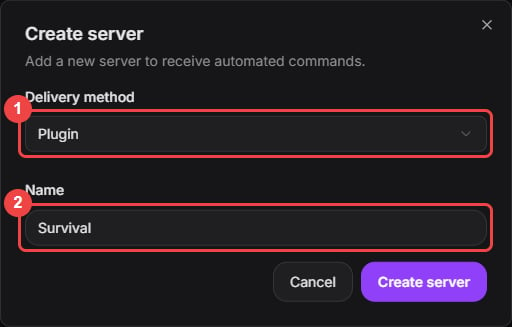
Choose the delivery method and give the connection a recognizable name.
Copy the token
Plugin and Script servers use a connection token. The dashboard shows it right after you create the server, and it stays available in Integrations > Servers: click Copy token on the server’s row whenever you configure the executor. RCON servers don’t have a token. Never include the token in screenshots, logs, repositories, or support messages.
The list masks each token. Copy token copies the full value for that server.