
Before you begin
You need:- The Enterprise plan. A store can have up to 10 endpoints.
- Permission to manage integrations for the store.
- A public HTTPS endpoint that accepts
POSTrequests. - A safe place to keep the webhook secret.
Add an endpoint in the dashboard
- Open Integrations > Webhooks.
- Click Create endpoint.
- Enter a Name, such as
Production order worker. - Paste your public HTTPS URL in Endpoint URL. Gamecart checks the URL before it saves the endpoint.
- Under Events, pick the events your application needs. Payment approved comes checked.
- Click Create endpoint, then copy the secret from Save this webhook secret now. Gamecart shows it only once. Secrets start with
gcwhsec_. - Open the endpoint’s row menu and select Send test to confirm that your endpoint receives the event and verifies the signature. See Testing and delivery logs.
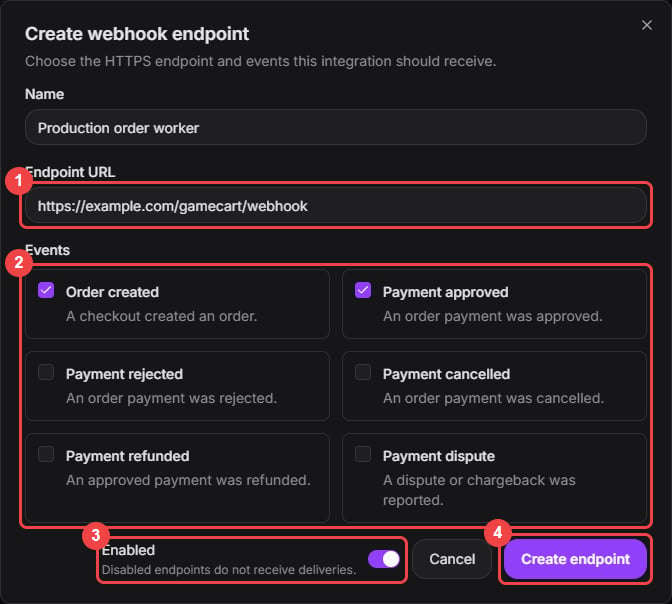
Choose the HTTPS endpoint and only the events your application uses.
webhooks:read and webhooks:write scopes. The endpoint pages under API reference list every operation.
Event types
When a dispute closes in the store’s favor, Gamecart sends
order.payment_approved again with the same eventId as the original approval. The order was already delivered at that first approval, so don’t deliver it again. Deduplicating by eventId handles this.
Manual orders created in the dashboard do not send seller webhooks.
Diagnostic event
webhook.test is not an event you subscribe to. It goes to the endpoint you test, whatever events that endpoint listens to, and carries a fixed sample order with the id GC-TEST0000.
Delivery payload
Every event has the same envelope. The order sits underdata.order and is the same object that GET /v1/seller/orders/{orderId} returns, always with the buyer:
eventIdis stable for the order and event type. Use it as your idempotency key.createdAtis when Gamecart created the event, in UTC.- Fields that do not apply are left out, as in API responses.
numberis the order number the seller sees. The webhook goes only to endpoints the seller configured, so it is safe to use there.
Delivery headers
Retries
Gamecart treats any2xx response as delivered.
For a non-2xx response, network failure, or invalid target, Gamecart records the failure and makes up to 5 attempts. After each failure, the retry delay is attemptCount * 5 minutes. Gamecart does not follow redirects.
If your endpoint receives the same eventId more than once, process it once and return 2xx for later duplicates.
Delivery statuses are:
Retention
Gamecart deletesSENT and FAILED deliveries 30 days after they were created. Pending deliveries are kept until they finish.