
.p12 certificate of an Efí application with the right scopes.
Efí issues separate credentials for homologation and production. Homologation matches Sandbox mode in Gamecart.
Create the Efí application
- Sign in to your Efí account.
- Open API and create an application.
- Enable the Pix API.
- Grant these scopes, in production and in homologation:
Without
payloadlocation.read, loading the QR code fails with insufficient_scope.
- Copy the Client ID and Client secret for the environment you will use.
- Download the
.p12certificate issued for that same environment. - Copy a Pix key that belongs to the Efí account.
Add it in Gamecart
- Open Settings > Gateways and click Add gateway.
- Click Add on Pix.
- Set Provider to Efí.
- Paste the Client ID, Client secret, and Pix key.
- Select the
.p12file under P12 certificate. Fill in Certificate password (optional) only if Efí gave the certificate a password. - Sandbox mode starts on. Leave it on for homologation credentials and turn it off for production.
- Click Save Configuration.
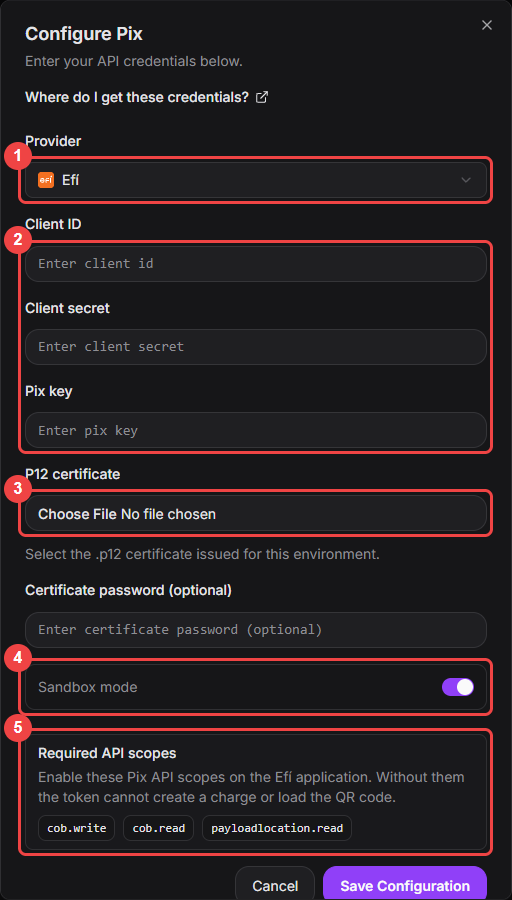
With Efí as the provider, the dialog asks for the credentials, the certificate, and lists the required scopes.
- Turn on the Pix switch in the gateway list when you are ready to take payments.