
paymentUrl and waits for your signed callback.
Flow
1
Configure the gateway
Create the gateway in the dashboard with the public HTTPS URL of your service. Gamecart generates the shared secret.
2
Buyer selects the gateway
The storefront sends checkout with
gatewayType: "CUSTOM" and the selected customGatewayId.3
Gamecart creates a payment
Gamecart saves a pending order and sends a signed
payment.create request to your payment creation URL.4
You return a payment URL
Your service returns a public HTTPS
paymentUrl. Gamecart redirects the buyer there.5
You confirm the result
After payment, your service sends a signed callback to the Gamecart
callbackUrl from the create-payment payload.Configure a custom gateway in the dashboard
Custom gateways need the Enterprise plan. A store can have up to 10.- Open Settings > Gateways and click Add gateway.
- On the Custom gateway card, click Create.
- Enter a Name. Buyers see it at checkout, along with the optional Description and Icon URL.
- Paste the public HTTPS URL of your service in Create payment URL.
- Turn off Enabled if your endpoint isn’t ready yet. The switch starts on.
- Click Save, then copy the shared secret from Save this shared secret now and store it securely. Gamecart shows it only once.
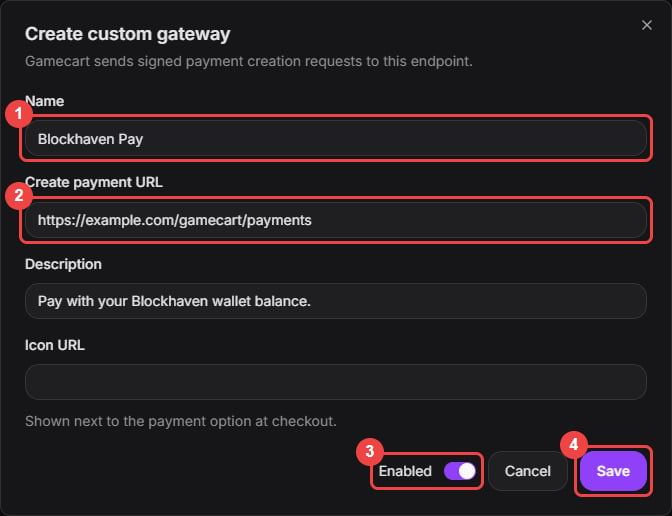
Name the gateway, paste the payment URL, and decide whether it starts enabled.
payment.create request. Then send a callback for that order.
A custom gateway sits in the same list as the other gateways. Drag it to change where it appears at checkout. To replace the secret, edit the gateway and click Rotate secret.
Gamecart waits up to 10 seconds for your service to answer the
payment.create request.
Storefront checkout request
When a buyer selects a custom gateway, checkout uses the public storefront checkout endpoint:gatewayType: "CUSTOM"requirescustomGatewayId.- Native gateways reject
customGatewayId. - The custom gateway must belong to the store. It must also be enabled, available on the store’s plan, and configured with a safe public payment creation URL. Deleted gateways are invalid.
- Gamecart revalidates the cart and totals before it calls your gateway.
Gamecart to your payment creation URL
Gamecart sends a signed request:Gamecart-Signature with the shared secret. See Webhook signatures for the canonical string.
Your response must be 2xx JSON:
paymentUrlis required.paymentUrlmust be an absolute public HTTPS URL.externalPaymentIdis optional and must be at most255characters.- Gamecart does not follow redirects from your payment creation URL.
- If your service cannot create the payment, Gamecart cancels the pending order and releases its coupon reservations.
Your callback to Gamecart
Send the result to the exactcallbackUrl from the create-payment request:
eventIdin the body must matchGamecart-Event-Id.statusmust not bePENDING.- Allowed status values are
APPROVED,REJECTED,CANCELLED,REFUNDED, andDISPUTE. amountmust match the order total exactly.currencymust match the order currency, case-insensitively.- The order must belong to the store and custom gateway in the URL.
- Sign the raw JSON body with the shared secret and the same canonical payload format.
202 Accepted when it accepts the callback. If the same custom gateway sends a successful callback eventId more than once, Gamecart handles it idempotently.