> ## Documentation Index
> Fetch the complete documentation index at: https://docs.gamecart.gg/llms.txt
> Use this file to discover all available pages before exploring further.
# Testing and delivery logs
> Send a test event and inspect what Gamecart delivered to your endpoint
## Send a test event
In **Integrations > Webhooks**, open the endpoint's row menu and select **Send test**. Gamecart queues a `webhook.test` delivery with a sample order and sends it through the same path as real events: same headers, same signature, same retries.
The endpoint must be enabled. A disabled endpoint refuses the test with `WEBHOOK_ENDPOINT_DISABLED`.
Use the test to check three things before you go live:
1. Your endpoint answers `2xx`.
2. The signature verifies with the secret you stored.
3. Your code reads `data.order` and ignores event types it does not handle.
Through the API, call `POST /v1/seller/webhooks/{id}/test` with the `webhooks:write` scope. The response is the queued delivery.
## Review delivery logs
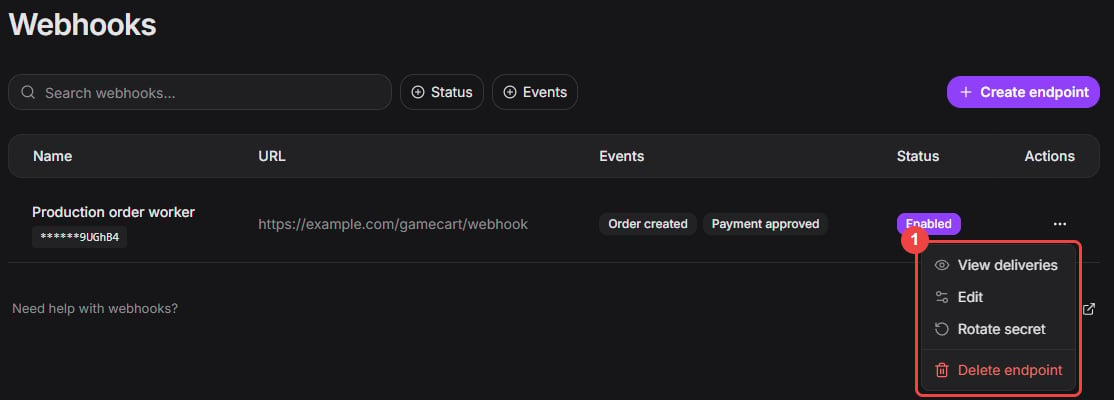
In the endpoint's row menu, select **View deliveries**. The same menu sends a test, edits the endpoint, rotates its secret, and deletes it.
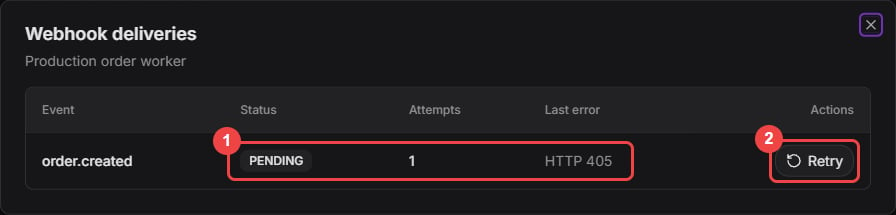
 Each entry shows the event, status, attempt count, and latest error. Select **View payload** to read the exact body Gamecart signed and sent, along with the last HTTP status your endpoint returned. Select **Retry** to queue an entry again with the same payload and `eventId`.
 Through the API, `GET /v1/seller/webhooks/{id}/deliveries` lists deliveries without payloads, and `GET /v1/seller/webhooks/{id}/deliveries/{deliveryId}` returns one delivery with its `payload`.
## When a delivery fails
`lastError` holds a short cause, such as `HTTP 500` or `TRANSPORT_TIMEOUT`, and `lastStatusCode` holds the HTTP status of the last attempt when there was one. Common causes:
| Symptom | What to check |
| ---------------------- | ---------------------------------------------------------------------------------------------------- |
| Status `3xx` | Gamecart does not follow redirects. Use the final URL. |
| Status `401` or `403` | Your endpoint rejected the signature. Verify it against the raw body, before parsing. |
| `TRANSPORT_TIMEOUT` | Gamecart waits 10 seconds for an answer. Answer first and process the event in the background. |
| `EXTERNAL_URL_INVALID` | The URL no longer resolves to a public address. Gamecart does not call private or internal networks. |
| Status `5xx` | Your endpoint failed. Gamecart retries up to 5 attempts. |
Deliveries are kept for 30 days after they finish.
Through the API, `GET /v1/seller/webhooks/{id}/deliveries` lists deliveries without payloads, and `GET /v1/seller/webhooks/{id}/deliveries/{deliveryId}` returns one delivery with its `payload`.
## When a delivery fails
`lastError` holds a short cause, such as `HTTP 500` or `TRANSPORT_TIMEOUT`, and `lastStatusCode` holds the HTTP status of the last attempt when there was one. Common causes:
| Symptom | What to check |
| ---------------------- | ---------------------------------------------------------------------------------------------------- |
| Status `3xx` | Gamecart does not follow redirects. Use the final URL. |
| Status `401` or `403` | Your endpoint rejected the signature. Verify it against the raw body, before parsing. |
| `TRANSPORT_TIMEOUT` | Gamecart waits 10 seconds for an answer. Answer first and process the event in the background. |
| `EXTERNAL_URL_INVALID` | The URL no longer resolves to a public address. Gamecart does not call private or internal networks. |
| Status `5xx` | Your endpoint failed. Gamecart retries up to 5 attempts. |
Deliveries are kept for 30 days after they finish.