> ## Documentation Index
> Fetch the complete documentation index at: https://docs.gamecart.gg/llms.txt
> Use this file to discover all available pages before exploring further.
# Test and troubleshoot server delivery
> Run a controlled delivery test and resolve common command-delivery issues
Run a controlled test before you use server delivery for live purchases. Use a dedicated product and test account so the result cannot affect a player's normal inventory or progress.
## Run a controlled delivery test
For a plugin or script executor, run `gamecart status` from the server or proxy console. For RCON, confirm that the server integration’s RCON settings are correct.
Create a test product and use an account identifier that you can inspect on the target server.
Use a safe payment or test path that is available to your store. Complete the controlled order through your storefront.
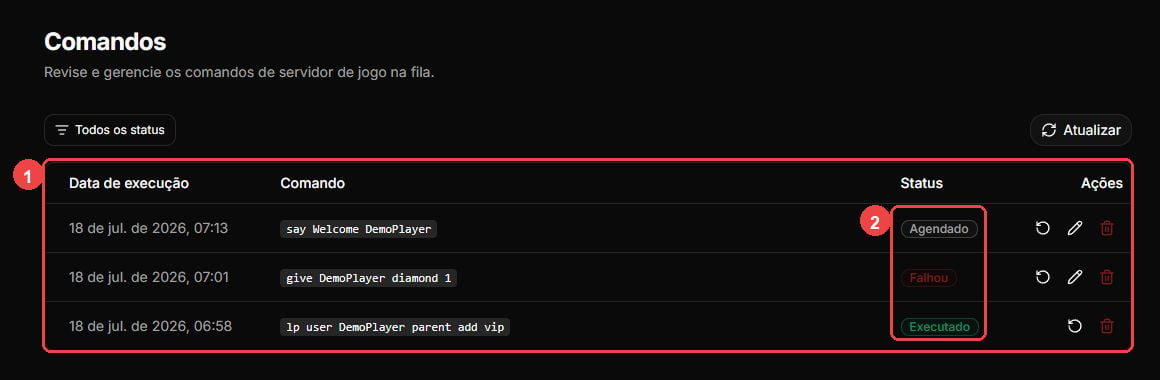
Open **Commands** in the dashboard and watch the command status.
Check the target server for the expected result. A console that accepts a dispatch does not prove that the command worked as intended.
## Understand command states
| Status | What it means |
| ------------ | ----------------------------------------------------------------------------------------------------------------------------------------------- |
| `SCHEDULED` | The command is queued for delivery. |
| `PROCESSING` | The delivery method is handling the command. Wait for a final state before taking manual action. |
| `EXECUTED` | Gamecart recorded the delivery as complete. Check the server when you need to confirm its effect. |
| `FAILED` | The delivery path could not complete the command. Review the safe status or error shown by Gamecart, then check the target command. |
| `UNCERTAIN` | An internal RCON delivery could not determine whether the command took effect. Check the server and use operator judgment before you resend it. |
 ## Troubleshoot common symptoms
| Symptom | First check |
| ---------------------------------- | ---------------------------------------------------------------------------------------- |
| Executor does not poll | Check the token, HTTPS API URL, and runtime logs. Then run `gamecart reload`. |
| Executor enters backoff | Check network reachability and any `408`, `429`, or `5xx` provider or backend responses. |
| Polling stops after a client error | Check credentials and configuration. Reload or restart after you correct them. |
| Command remains processing | Confirm the executor and callback path before you take manual action. |
| Command failed | Read the safe status or error shown by Gamecart and verify the target command manually. |
| RCON is uncertain | Check the server for the command’s effect before you resend it. |
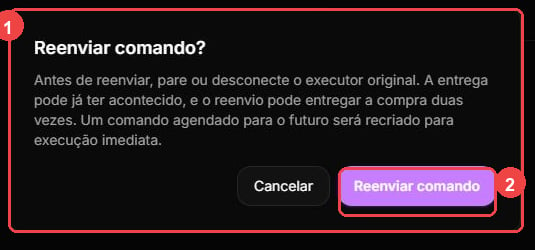
Resend creates a new delivery attempt and may duplicate a command that already ran. Stop any duplicate executor installations, inspect the server, and confirm the dashboard warning before you proceed.
## Troubleshoot common symptoms
| Symptom | First check |
| ---------------------------------- | ---------------------------------------------------------------------------------------- |
| Executor does not poll | Check the token, HTTPS API URL, and runtime logs. Then run `gamecart reload`. |
| Executor enters backoff | Check network reachability and any `408`, `429`, or `5xx` provider or backend responses. |
| Polling stops after a client error | Check credentials and configuration. Reload or restart after you correct them. |
| Command remains processing | Confirm the executor and callback path before you take manual action. |
| Command failed | Read the safe status or error shown by Gamecart and verify the target command manually. |
| RCON is uncertain | Check the server for the command’s effect before you resend it. |
Resend creates a new delivery attempt and may duplicate a command that already ran. Stop any duplicate executor installations, inspect the server, and confirm the dashboard warning before you proceed.
 If the problem continues, record the visible command status and safe runtime information before you contact support. Do not share tokens, credentials, or buyer data.