> ## Documentation Index
> Fetch the complete documentation index at: https://docs.gamecart.gg/llms.txt
> Use this file to discover all available pages before exploring further.
# Install the Minecraft executor
> Connect a Minecraft server or proxy to Gamecart command delivery
Use this tutorial after you [connect a server](/tutorials/server-delivery/connect-server) with the `PLUGIN` method.
## Choose the matching artifact
| Runtime | Artifact family | Java requirement |
| ----------------------------------- | ------------------------- | ---------------- |
| Spigot 1.8.8+, Paper, Purpur, Folia | `gamecart-spigot` | Java 8 bytecode |
| BungeeCord-compatible proxy | `gamecart-bungeecord` | Java 8 bytecode |
| Velocity 3.5+ | `gamecart-velocity` | Java 21 |
| Fabric 1.21.4 | `gamecart-fabric-1.21.4` | Java 21 |
| Fabric 1.21.11 | `gamecart-fabric-1.21.11` | Java 21 |
| Fabric 26.1 | `gamecart-fabric-26.1` | Java 25 |
Downloads are not available from this page yet. Continue only if you already have the matching JAR.
For Fabric, install the matching Fabric API line as well:
* `gamecart-fabric-1.21.4`: Fabric Loader `0.19.3+` and Fabric API `0.119.4+1.21.4`
* `gamecart-fabric-1.21.11`: Fabric Loader `0.19.3+` and Fabric API `0.141.4+1.21.11`
* `gamecart-fabric-26.1`: Fabric Loader `0.19.3+` and Fabric API `0.145.1+26.1`
## Install and configure the executor
1. Copy exactly one matching JAR into `plugins/`, or into `mods/` for Fabric.
2. Start the server or proxy once to generate its configuration.
3. For Fabric, open `config/gamecart.properties`. For plugin and proxy runtimes, open the configuration in the platform data folder.
4. Set your server token and restart the runtime.
```properties theme={"dark"}
serverToken=
apiUrl=https://api.gamecart.gg
pollIntervalSeconds=5
debug=false
```
Copy the server token from **Integrations > Servers**. Keep it secret.
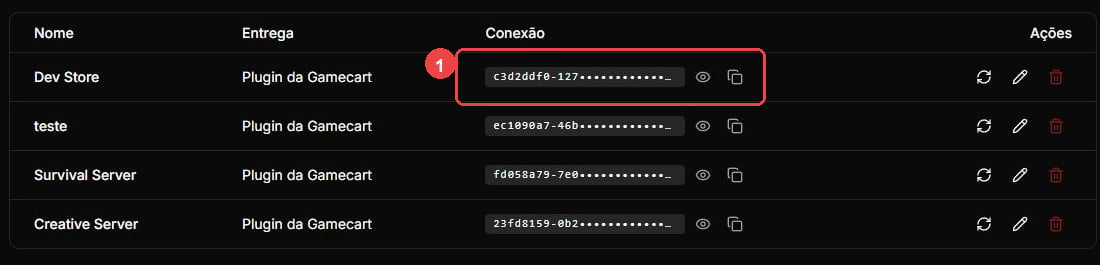 Set `pollIntervalSeconds` to a value from `2` through `300`. Unless you are testing on loopback, `apiUrl` must use HTTPS. With `debug=true`, the executor logs sanitized state and status information. It does not log tokens, commands, player identifiers, HTTP bodies, buyer data, or order data.
## Understand where commands run
Spigot, Paper, Purpur, Folia, and Fabric run commands on the local server console. BungeeCord and Velocity run them on the proxy console and do not automatically forward them to backend servers.
Folia support covers the Gamecart adapter. It does not guarantee that arbitrary third-party commands are safe on Folia.
## Operate the executor
Use `gamecart status` to check the executor state. After changing its configuration, use `gamecart reload` to validate and apply the new values.
Network errors and `408`, `429`, and `5xx` responses back off before polling again. Invalid credentials and other non-retryable protocol failures stop polling until you reload the configuration or restart the runtime.
If the executor runs a command locally but cannot confirm the callback, a resend can duplicate fulfillment. Confirm the outcome in the Gamecart dashboard before resending.
Set `pollIntervalSeconds` to a value from `2` through `300`. Unless you are testing on loopback, `apiUrl` must use HTTPS. With `debug=true`, the executor logs sanitized state and status information. It does not log tokens, commands, player identifiers, HTTP bodies, buyer data, or order data.
## Understand where commands run
Spigot, Paper, Purpur, Folia, and Fabric run commands on the local server console. BungeeCord and Velocity run them on the proxy console and do not automatically forward them to backend servers.
Folia support covers the Gamecart adapter. It does not guarantee that arbitrary third-party commands are safe on Folia.
## Operate the executor
Use `gamecart status` to check the executor state. After changing its configuration, use `gamecart reload` to validate and apply the new values.
Network errors and `408`, `429`, and `5xx` responses back off before polling again. Invalid credentials and other non-retryable protocol failures stop polling until you reload the configuration or restart the runtime.
If the executor runs a command locally but cannot confirm the callback, a resend can duplicate fulfillment. Confirm the outcome in the Gamecart dashboard before resending.