> ## Documentation Index
> Fetch the complete documentation index at: https://docs.gamecart.gg/llms.txt
> Use this file to discover all available pages before exploring further.
# Install the Hytale executor
> Connect a Hytale server to Gamecart command delivery
Use this tutorial after you [connect a server](/tutorials/server-delivery/connect-server) with the `PLUGIN` method.
## Before you begin
Make sure you have:
* Java 25.
* Hytale Server release API `0.5.6`.
* A Gamecart server configured as `PLUGIN`.
* The Gamecart Hytale executor JAR.
Downloads are not available from this page yet. Continue only if you already have the JAR.
## Install and configure the executor
1. Copy the JAR into your Hytale server's `mods/` directory.
2. Start the server once to generate `mods/Gamecart_Gamecart/config.properties`.
3. Open `mods/Gamecart_Gamecart/config.properties` and set your server token.
4. Restart the server, or run `gamecart reload` after saving a valid configuration.
```properties theme={"dark"}
serverToken=
apiUrl=https://api.gamecart.gg
pollIntervalSeconds=5
debug=false
```
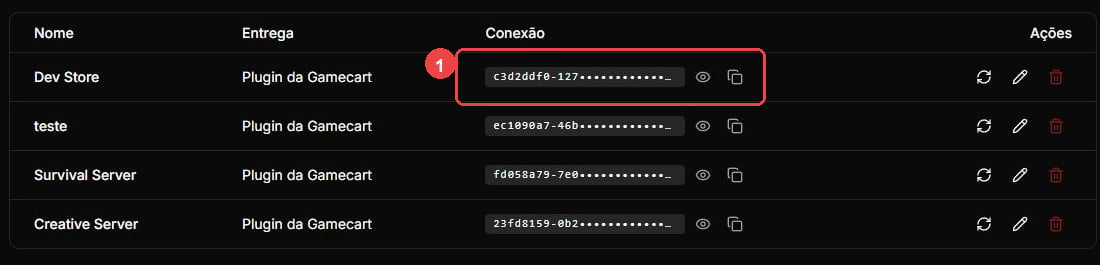
Copy the server token from **Integrations > Servers**. Keep it secret.
 Set `pollIntervalSeconds` to a value from `2` through `300`. Unless you are testing on loopback, `apiUrl` must use HTTPS. With `debug=true`, the executor logs sanitized state and status information. It does not log tokens, commands, player identifiers, HTTP bodies, buyer data, or order data.
## Operate the executor
The console and users with the `gamecart.admin` permission can run `gamecart status`. The command shows the plugin version, pinned Hytale release, connector state, last poll, and current backoff. Run `gamecart reload` to validate and apply configuration changes. Reloading also retries a pending callback without dispatching its command again.
Use exactly one Hytale executor installation for each Gamecart server token. The executor processes one command and its `done` or `fail` callback before pulling another.
Network errors and `408`, `429`, and `5xx` responses use capped backoff before polling again. Invalid credentials, unexpected redirects or client errors, and malformed, invalid, or oversized API responses stop polling until you reload the configuration or restart the server.
If the executor runs a command but loses its callback, manually resending the command can duplicate fulfillment. Stop the original executor and confirm that risk in the Gamecart dashboard before resending.
Set `pollIntervalSeconds` to a value from `2` through `300`. Unless you are testing on loopback, `apiUrl` must use HTTPS. With `debug=true`, the executor logs sanitized state and status information. It does not log tokens, commands, player identifiers, HTTP bodies, buyer data, or order data.
## Operate the executor
The console and users with the `gamecart.admin` permission can run `gamecart status`. The command shows the plugin version, pinned Hytale release, connector state, last poll, and current backoff. Run `gamecart reload` to validate and apply configuration changes. Reloading also retries a pending callback without dispatching its command again.
Use exactly one Hytale executor installation for each Gamecart server token. The executor processes one command and its `done` or `fail` callback before pulling another.
Network errors and `408`, `429`, and `5xx` responses use capped backoff before polling again. Invalid credentials, unexpected redirects or client errors, and malformed, invalid, or oversized API responses stop polling until you reload the configuration or restart the server.
If the executor runs a command but loses its callback, manually resending the command can duplicate fulfillment. Stop the original executor and confirm that risk in the Gamecart dashboard before resending.