> ## Documentation Index
> Fetch the complete documentation index at: https://docs.gamecart.gg/llms.txt
> Use this file to discover all available pages before exploring further.
# Install the FiveM executor
> Connect a FiveM server resource to Gamecart command delivery
Use this tutorial after you [connect a server](/tutorials/server-delivery/connect-server) with the `SCRIPT` method.
## Before you begin
The executor is a server-only FiveM resource. It requires Cfx Node 22 and has no client scripts or NUI.
Downloads are not available from this page yet. Continue only if you already have the resource.
## Install and configure the executor
1. Place the resource at `resources/[gamecart]/gamecart`.
2. Keep the resource folder named `gamecart` when using the documented ACE principal.
3. Open `config.js` and set your server token.
4. Add the ACE rules and `ensure gamecart` to `server.cfg`, then restart the resource.
```js theme={"dark"}
module.exports = Object.freeze({
serverToken: "paste-token-here",
apiUrl: "https://api.gamecart.gg",
pollIntervalSeconds: 5,
debug: false,
})
```
Copy the server token from **Integrations > Servers**. Keep it secret.
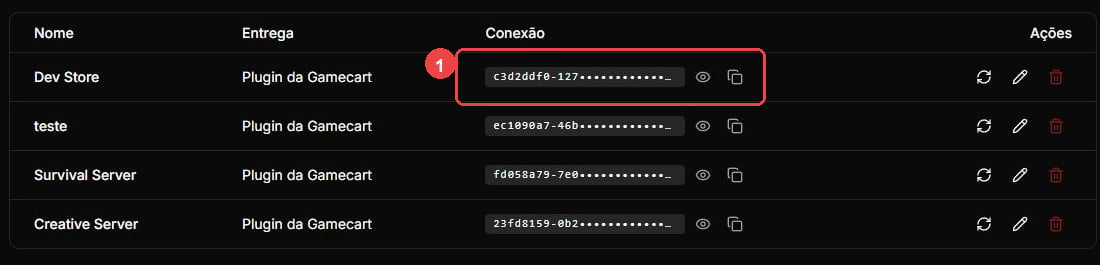 Set `pollIntervalSeconds` to a value from `2` through `300`. Unless you use a loopback development endpoint, `apiUrl` must use HTTPS. With `debug=true`, the executor writes sanitized state and status logs. It does not log tokens, commands, player nicknames, HTTP bodies, buyer data, or order data.
## Grant command permissions
Fulfillment uses `ExecuteCommand` under the `resource.gamecart` principal. Grant administrators access to the local commands and start the resource:
```cfg theme={"dark"}
add_ace group.admin command.gamecart allow
ensure gamecart
```
Prefer explicit command grants whenever the target resource exposes command-specific ACE objects.
The broad grant below permits `resource.gamecart` to execute every registered server command. Use it only when you understand that risk.
```cfg theme={"dark"}
add_ace resource.gamecart command allow
```
## Operate the executor
Run `gamecart status` to see the connector version, state, time since the last pull, current backoff, and pending callback queue ID. Run `gamecart reload` to validate and apply `config.js`. Reloading resumes a pending callback without dispatching its command again.
Use exactly one installation for each Gamecart server token. Network errors and `408`, `429`, and `5xx` responses use capped `5`/`10`/`30`/`60` second backoff before polling again. Invalid credentials, redirects, and other non-retryable HTTP errors stop polling until you reload the configuration or restart the resource.
When you stop the resource, it invalidates unfinished presence, pull, dispatch, and callback work. Stale asynchronous tasks cannot restart polling or change the connector state.
If a command is dispatched but its callback is not confirmed, manually resending it can duplicate fulfillment. Stop the original executor and confirm the outcome in the Gamecart dashboard before resending.
Set `pollIntervalSeconds` to a value from `2` through `300`. Unless you use a loopback development endpoint, `apiUrl` must use HTTPS. With `debug=true`, the executor writes sanitized state and status logs. It does not log tokens, commands, player nicknames, HTTP bodies, buyer data, or order data.
## Grant command permissions
Fulfillment uses `ExecuteCommand` under the `resource.gamecart` principal. Grant administrators access to the local commands and start the resource:
```cfg theme={"dark"}
add_ace group.admin command.gamecart allow
ensure gamecart
```
Prefer explicit command grants whenever the target resource exposes command-specific ACE objects.
The broad grant below permits `resource.gamecart` to execute every registered server command. Use it only when you understand that risk.
```cfg theme={"dark"}
add_ace resource.gamecart command allow
```
## Operate the executor
Run `gamecart status` to see the connector version, state, time since the last pull, current backoff, and pending callback queue ID. Run `gamecart reload` to validate and apply `config.js`. Reloading resumes a pending callback without dispatching its command again.
Use exactly one installation for each Gamecart server token. Network errors and `408`, `429`, and `5xx` responses use capped `5`/`10`/`30`/`60` second backoff before polling again. Invalid credentials, redirects, and other non-retryable HTTP errors stop polling until you reload the configuration or restart the resource.
When you stop the resource, it invalidates unfinished presence, pull, dispatch, and callback work. Stale asynchronous tasks cannot restart polling or change the connector state.
If a command is dispatched but its callback is not confirmed, manually resending it can duplicate fulfillment. Stop the original executor and confirm the outcome in the Gamecart dashboard before resending.