> ## Documentation Index
> Fetch the complete documentation index at: https://docs.gamecart.gg/llms.txt
> Use this file to discover all available pages before exploring further.
# Connect a server
> Create a Gamecart server integration and protect its connection token
Start by creating the server integration that Gamecart will use for delivery.
## Before you begin
Make sure you have:
* A selected store in the dashboard.
* `MANAGE_SERVERS` access for that store.
* The target game server runtime identified.
## Create the connection
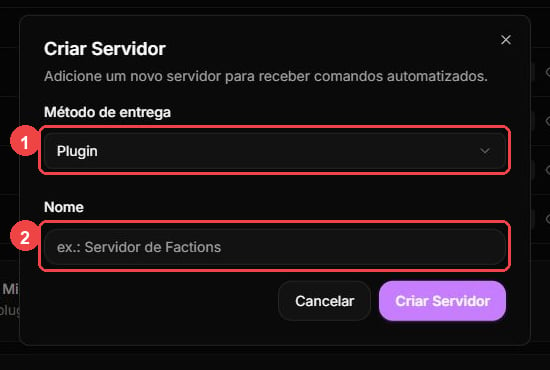
In the dashboard, open **Integrations > Servers** and select **Create server**. Choose the delivery type for your runtime, enter a name you will recognize, and save the integration.
 ## Copy the token
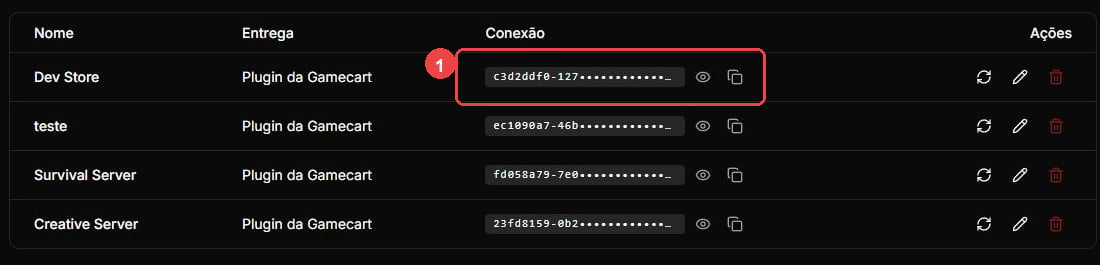
Only `PLUGIN` and `SCRIPT` integrations use a connection token. You can return to the dashboard to copy it when you configure the executor.
Never include the token in screenshots, logs, repositories, or support messages.
## Copy the token
Only `PLUGIN` and `SCRIPT` integrations use a connection token. You can return to the dashboard to copy it when you configure the executor.
Never include the token in screenshots, logs, repositories, or support messages.
 ## Use one installation per token
Run only one executor installation for each server token. If two installations use the same token, either one can receive a command intended for the other runtime.
## Rotate safely
Before you rotate a token, stop the executor. Replace the token in its configuration, then reload or restart it.
## Next step
Follow the setup for your delivery method: [Minecraft plugin](/tutorials/server-delivery/minecraft), [Hytale plugin](/tutorials/server-delivery/hytale), [FiveM script](/tutorials/server-delivery/fivem), or [Minecraft RCON](/tutorials/server-delivery/minecraft-rcon). Then [configure the product commands](/tutorials/server-delivery/configure-commands).
## Use one installation per token
Run only one executor installation for each server token. If two installations use the same token, either one can receive a command intended for the other runtime.
## Rotate safely
Before you rotate a token, stop the executor. Replace the token in its configuration, then reload or restart it.
## Next step
Follow the setup for your delivery method: [Minecraft plugin](/tutorials/server-delivery/minecraft), [Hytale plugin](/tutorials/server-delivery/hytale), [FiveM script](/tutorials/server-delivery/fivem), or [Minecraft RCON](/tutorials/server-delivery/minecraft-rcon). Then [configure the product commands](/tutorials/server-delivery/configure-commands).